LogikSign

Request signatures, capture signer intent, and generate a completion package with a verifiable audit trail — client signs first, your team countersigns.

Why clients like it

Fast
Sign from any device
Clear
Guided steps + fewer mistakes
Verifiable
Audit trail + tamper-evident hashes
Complete
Downloadable completion package

What it is

LogikSign is our electronic signing service. Your team uploads a PDF, places signature, date, name, and title fields, and sends a secure link to the recipient. The signer reviews, verifies identity, and signs online.

When signing completes, we always generate a Certificate of Completion as part of the same workflow, record the audit trail, and provide a downloadable completion ZIP with the signed PDF and that certificate only.

Key features

Field placement
Place signature, date, name, and title fields directly on your PDF.
Identity verification
Verify signers with a PIN or account login, depending on the workflow.
Audit trail
Every important action is logged with timestamps and context.
Completion package
Download a ZIP with the signed PDF and certificate of completion. Audit details stay in the product and on the verification page.
Verification
Use the verification page to review the audit trail and tamper-evident hashes.
Request signature
Client signs first; your team countersigns to release the final completion package.
Your workspace
Your staff and clients each have the right access: senders prepare and track envelopes; signers complete in a guided flow.
Document creator
Build agreements and letters from templates (or blank), with your letterhead, merge fields, draft PDF preview, then hand off to request signature — optional add-on.

Premium additions

Beyond core signing, we offer optional add-ons on your account when you need them — branded communications, tighter control over links, gentle reminders for pending signatures, saved PDFs/layouts so repeat sends go faster, document creation from reusable templates with letterhead, and audit reporting with charts and export when your organization opts in.

Branded emails

Logo, display sender name, and reply-to so signing invitations match your company identity.

Custom email copy

Edit subject lines and intro/footer text for signing links and completion notices.

Link expiry controls

Set how long signing links stay valid when you need time-bounded offers or compliance windows.

Weekly reminders

Optional automated nudges for signers who have not completed yet, scheduled on the service side when you choose this add-on.

Send library

Store frequently used PDFs and saved field layouts so staff spend less time re-uploading and re-placing fields on every send.

Document creator

Start from reusable templates or a blank document — fill merge fields, preview with your letterhead and logo, open a draft PDF to verify, then continue to Request signature. Includes template version history when enabled for your workspace.

Operations & trust

Full audit trail for your account, optional log retention, safeguards around sign-in abuse, and certificate regeneration when you need a clean PDF.

Reporting & analytics

Filter audit activity by date range and event type, paginate through results, visualize trends and top event types, and download a CSV for spreadsheets or compliance packs — available when reporting is enabled for your workspace.

Reporting in the team portal

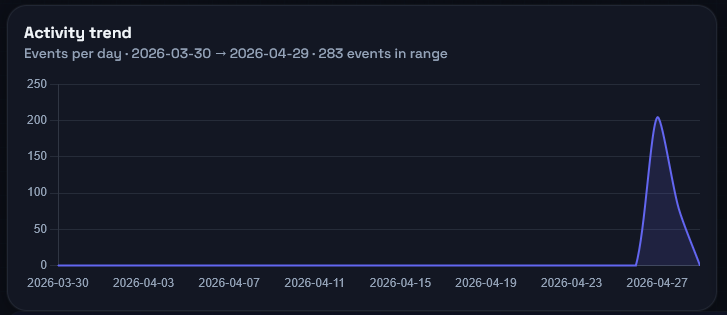
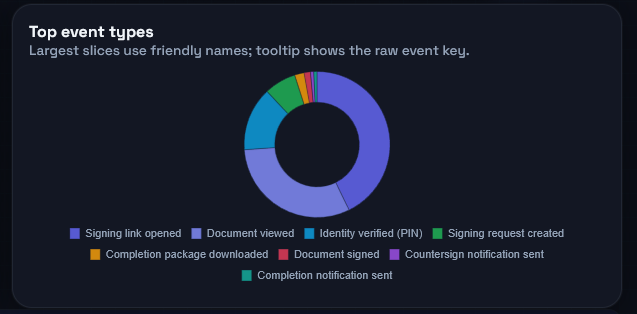
Staff with access see activity over time and how events break down, alongside the detailed log — so you can spot patterns without leaving the product.

Sample chart: audit events by day over a selected period
Activity by day
Sample chart: share of top audit event types
Top event types

What’s included depends on your service agreement — ask us what’s on for your organization.

Pricing

Team

Ask us for a quote

Core e-signatures, completion ZIP, audit trail, and your team’s sender portal.

  • Client signs first, then your team countersigns
  • Certificate of completion + verification
  • Client accounts & staff roles
Contact us

Dedicated

Custom Annual or high-volume

For heavier signing volume, tighter compliance needs, or hands-on support — we align retention, rollout, and operations with you.

  • Priority support & onboarding
  • Audit visibility and retention options
  • Operational safeguards (sign-in protection, monitoring)
  • Automated reminders & housekeeping as agreed
Contact us

Built for your team & signers

For your team

  • Upload PDFs and place signing fields
  • Create documents from templates (optional) with letterhead, then request signature
  • Request signatures and track pending / signed status
  • Countersign to release completion packages

For recipients (clients)

  • Open the link, verify, review, and sign
  • See documents sent to your email in “My documents”
  • Download completed documents after signing

How it works

  1. Your team prepares a PDF — upload one, pull from the send library, or create from a template when Document creator is enabled.
  2. Client opens the signing link and verifies identity (PIN and/or account login).
  3. Client signs first.
  4. Your team countersigns to finalize.
  5. Completion package is generated (signed PDF + certificate in the ZIP; audit trail in the portal and verification flow).

Trust & compliance

  • Audit trail events with timestamps, actor, IP, and user agent
  • Certificate verification page
  • Tamper-evident SHA-256 hashes for PDFs, meta, and audit trail
Open verification page (Paste a verification token from a completion certificate.)

Common use cases

HR onboarding
Offer letters, policies, acknowledgements.
Sales agreements
Quotes, contracts, change orders.
Approvals
Internal approvals with a clear audit trail.
Vendor & client forms
W‑9, intake forms, service agreements.
NDAs
Fast signatures with verification evidence.
Service agreements
Contracts, quotes, policies, onboarding — template → PDF → sign.
Operations
SOP sign-off, checklists, compliance forms.

FAQ

Do clients need an account?
No. Clients can sign directly from the link (PIN), or they can sign in to see all documents sent to their email in one place.
How do I verify a signed document?
Use the verification page to review the audit trail and the SHA‑256 hashes for the PDFs and metadata.
What is included in the completion ZIP?
Every completed signing produces a certificate of completion. The completion ZIP contains only the signed PDF and that certificate. Timestamps, hashes, and audit events are available in the verification flow and team portal.
Is MFA supported?
Yes — team portal and client sign-in can require email verification codes (configurable).
What counts as “premium”?
Add-ons such as branded email identity, custom email copy, link expiry options, weekly reminders, the send library, document creator (templates, letterhead PDFs, draft preview), and optional reporting (charts + CSV export of audit activity) are included when they're part of your service agreement — we keep core signing straightforward and add extras only where you need them.
Ready to review or sign?
Clients can sign in to view documents, or open the link they were sent.